library(reticulate)
use_virtualenv("r-reticulate", required = TRUE)03.Mosaic
Comparisons
Mosaic
Treemap
1 Setup
1.1 Create R and Python connection
1.2 Load data
import agrobr
import asyncio
import pandas as pd
import numpy as np

from agrobr import ibge

df = asyncio.run(agrobr.datasets.censo_agropecuario("uso_terra"))print(df.head())
df_clean = df[
    (df['ano'] == 2017) &
    (df['unidade'] == 'hectares')
].copy()
1.3 Load R packages
library(tidytext)
library(ggtext)
library(showtext)
library(stringr)
library(tidyverse)
library(treemapify)
library(here)
1.4 Set theme
# Font setup
font_add_google("Commissioner")
showtext_auto()
showtext_opts(dpi = 300)
font_main <- "Commissioner"

# Font Awesome for caption
font_add(family = "fa-brands", regular = here("fonts", "Font Awesome 7 Brands-Regular-400.otf"))

# Colors
title_col <- "grey10"
text_col  <- "grey30"
bg_col    <- "#F2F4F8"

# Palette for subtitle
col_pasture <- "#a3b18a"
col_forest  <- "#1B4332"
col_crop    <- "#E9C46A"

# Palette for categories
palette <- c(
  "Forests"      = "#1B4332",
  "Croplands"    = "#E9C46A",
  "Pasturelands" = "#a3b18a",
  "Agroforestry" = "#606c38",
  "Others"       = "#B0B0B0"
)
2 Prepare data for plotting
# Processing the Python data frame
df_mosaic_final <- py$df_clean |>
  filter(!is.na(valor), valor > 0) |>
  mutate(
    # Simplified categories (no subcategories)
    category = case_when(
      str_detect(categoria, fixed("agroflorestais", ignore_case = TRUE)) ~ "Agroforestry",
      str_detect(categoria, fixed("Lavouras", ignore_case = TRUE)) ~ "Croplands",
      str_detect(categoria, fixed("Pastagens", ignore_case = TRUE)) ~ "Pasturelands",
      str_detect(categoria, fixed("Matas", ignore_case = TRUE)) |
        str_detect(categoria, fixed("florestas", ignore_case = TRUE)) ~ "Forests",
      TRUE ~ "Others"
    )
  ) |>
  # Grouping by State (localidade) and Category
  group_by(localidade, category) |>
  summarise(valor = sum(valor), .groups = "drop") |>
  filter(category != "Agroforestry") |>
  filter(category != "Others")
3 Plot
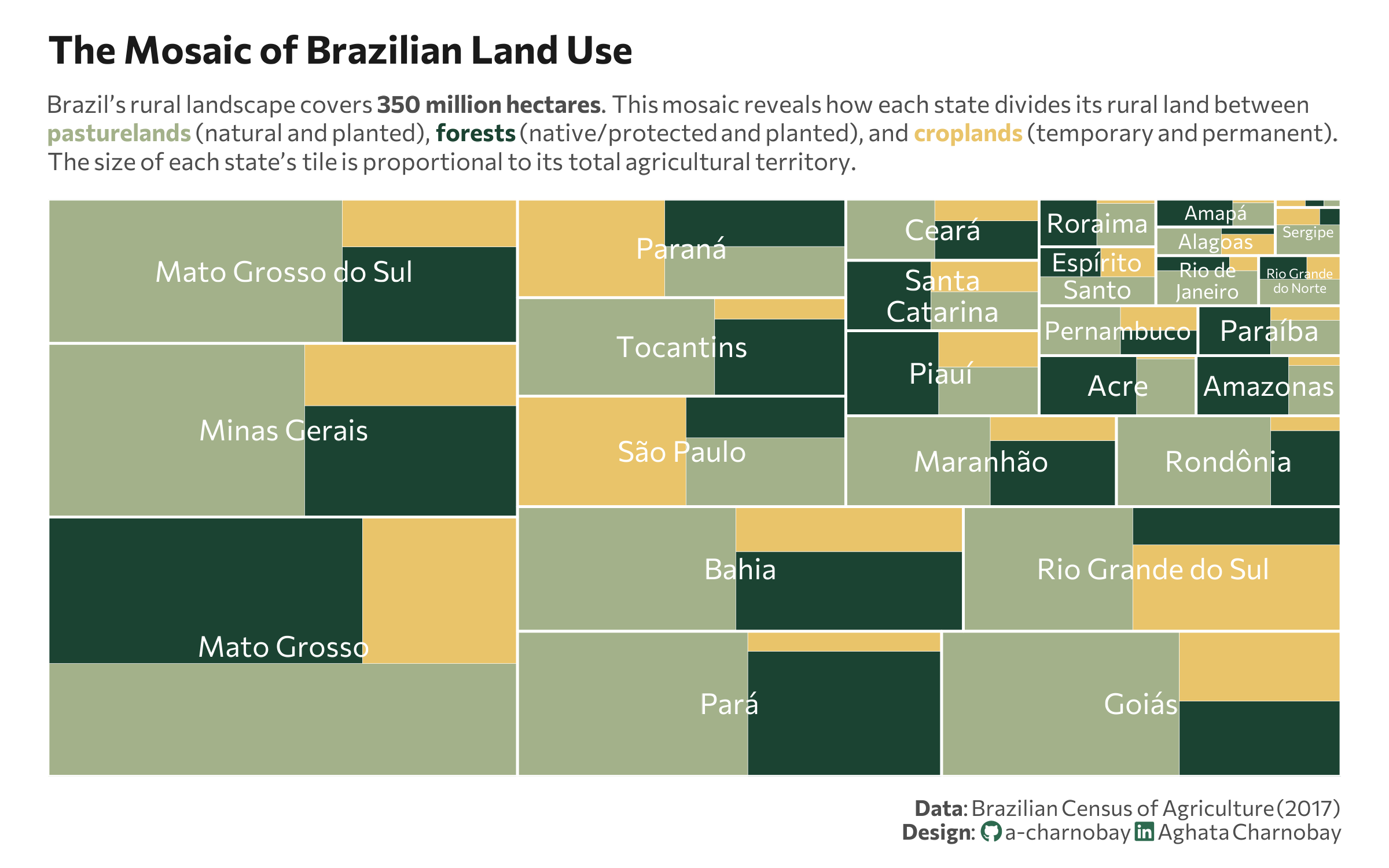
p <- ggplot(df_mosaic_final,
aes(area = valor,
fill = category,
label = localidade,
subgroup = localidade)) + # Changed subgroup to localidade
# Draw the categories inside the state groups
geom_treemap(color = "white", size = 0.2) +
geom_treemap_subgroup_border(color = "white", size = 1.5) +
# state labels
geom_treemap_subgroup_text(
place = "center",
grow = FALSE,
reflow = TRUE,
colour = "white",
family = font_main,
size = 12
) +
scale_fill_manual(values = palette) +
labs(
title = "The Mosaic of Brazilian Land Use",
subtitle = paste0(
"Brazil's rural landscape covers **350 million hectares**. This mosaic reveals how each state divides its rural land between<br>",
"<span style='color:", col_pasture, ";'><b>pasturelands</b></span> (natural and planted), ",
"<span style='color:", col_forest, ";'><b>forests</b></span> (native/protected and planted), and ",
"<span style='color:", col_crop, ";'><b>croplands</b></span> (temporary and permanent).<br>",
"The size of each state's tile is proportional to its total agricultural territory."
),
caption = paste0(
"**Data**: Brazilian Census of Agriculture (2017)",
"<br>**Design**: <span style='font-family:fa-brands; color:#2D6A4F;'></span> a-charnobay ",
"<span style='font-family:fa-brands; color:#2D6A4F;'></span> Aghata Charnobay"
),
fill = "Category"
) +
theme_minimal(base_family = font_main) +
theme(
plot.title = element_text(face = "bold", size = 16, color = title_col,margin = margin(t = 5, b = 10)),
plot.subtitle = element_markdown(size = 10, color = text_col, margin = margin(b = 10),lineheight = 1.2),
plot.title.position = "plot",
plot.caption = element_markdown(size = 9, color = text_col, lineheight = 1.1, margin = margin(t = 10)),
plot.background = element_rect(fill = "white", color = NA),
panel.background = element_rect(fill = "white", color = NA),
plot.margin = margin(10, 20, 10, 20),
panel.grid = element_blank(),
axis.text.x = element_blank(),
axis.text.y = element_blank(),
legend.position = "none",
)